

增强型和实时声呐

Designed to fish

连接并投屏

详细的 C‑MAP® 海图
增强型换能器选项
全新设计的 TripleShot™ HD 和 SplitShot™ HD 换能器提供更出色的清晰度、探测深度和灵敏度——这一切都带来更好的水下性能。Eagle Eye™ 可轻松访问实时声呐。
The Eagle Eye™ transducer offers focused forward and down live sonar views combined with CHIRP & DownScan Imaging™ in one transducer, exclusively available with Eagle Eye fish finders.
TripleShot™ HD features the fish-finding capability of wide-angle high CHIRP sonar and the high-resolution images of fish-holding structure from SideScan and DownScan Imaging™.
Excludes Eagle 4x
Get the best underwater views below the boat with SplitShot™ HD, featuring the fish-finding capability of wide-angle high CHIRP sonar and the high-resolution images of fish-holding structure from DownScan Imaging™.
Excludes Eagle 4x
Perfect for anglers who want the best views below the boat, even in deeper water, HDI transducers feature the fish-finding capability of powerful CHIRP sonar and the high-resolution images of fish-holding structure from DownScan Imaging™.
Excludes Eagle 4x
With its wide-angle sonar, the Bullet Transducer provides more coverage of the water column with a continuous right to left scroll across the screen, making it easy to interpret and spot fish.
Eagle 4x only


Eagle Series Products
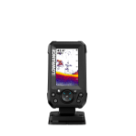
Eagle with
Bullet Skimmer
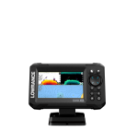
Eagle with
SplitShot™ HD
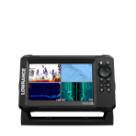
Eagle with TripleShot™ HD
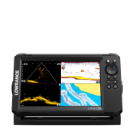
Eagle Eye™
with Live Sonar
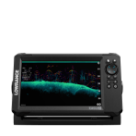
Eagle with
50/200 HDI
Technical Specifications
SCREEN SIZE OPTIONS
全新 Eagle Eye™,配备实时声呐
实时查看鱼群与水下结构的关系,以及它们对拟饵呈现的反应,从而快速调整,促使其咬钩。


前视视图

下视图
CHIRP 声呐
CHIRP 声呐可提供单个鱼类目标的高分辨率视图,即使目标靠近底部或紧密成群悬浮时也不例外。
不包括 Eagle 4x

DownScan Imaging™
DownScan Imaging 可更轻松地识别鱼类与结构物之间的关系,直接在船只下方提供岩石、树木和其他水下结构物的照片般图像。
Eagle 4x 除外

SideScan 成像
SideScan 有助于在大范围水域搜索鱼类聚集的结构。可探测船只两侧各远至 600ft 的区域,帮助您在更短时间内覆盖更多水域。
需要 TripleShot™ HD 换能器
Eagle 4x 除外

FishReveal™
FishReveal™ 将 DownScan Imaging 与 CHIRP 相结合,让区分鱼群与水草变得前所未有地轻松。毕竟,Eagle 正是凭借其视野而表现出色。
不包括 Eagle 4x

全新 IPS 屏幕
Eagle 采用全新 IPS 屏幕,提升分辨率、清晰度和可视性,即使在直射阳光下佩戴偏光太阳镜也清晰可见。

全新配色方案
一系列全新的配色方案*可让您根据不断变化的条件调整显示效果。
*不包括 4x 型号

连接并投屏
Eagle 从一开始就为您提供最佳设置,因此您无需花时间自行摸索。
新型旋拧锁定连接器
改进型旋锁式连接器便于可靠地安装和拆卸,使 Eagle 成为适用于各种钓鱼场景的出色便携式解决方案。

自动调谐声呐
借助自动调谐声呐,您可以把更多时间用于垂钓,减少反复调整声呐设置的时间;它会随着垂钓条件的变化自动调整设置,确保您每次都能获得最佳声呐图像。

详细的 C-MAP® 海图
多花时间钓鱼,少花时间搜寻。
高分辨率海图
Eagle 预装了适用于美国的高分辨率 C-MAP® 内陆海图,覆盖超过 17,000+ 个美国湖泊;您也可以选择我们的 DISCOVER OnBoard 海图套装,以获得更广泛的内陆和沿海覆盖范围。

Genesis Live
借助 Genesis Live,您可以实时创建当地湖泊或未测绘水域的自定义 ½-foot 等深线地图,从而获得发现最佳钓点并更快导航到达所需的全部细节。

常见问题
哪种 Eagle 换能器选项最适合我的垂钓方式?
对于浅水 (-60ft),如果您大部分时间都在寻找船下的鱼,并且不需要使用 SideScan 来查看船的两侧,那么 SplitShot 传感器是理想的选择。如果您想通过 SideScan、DownScan 和 CHIRP 查看下方和侧面的所有选项,则需要 TripleShot。对于更深水域 (+60ft) 钓鱼,HDI 声纳是最佳选择。
我还能调整声呐设置并关闭自动调谐吗?
自动调谐声呐旨在从一开始就为您提供最佳设置,无需花时间调整设置;不过,如果您希望以不同方式查看画面,仍然可以轻松调整您的设置。
这些 Eagle 设备能与 NMEA 2000 网络配合使用吗?
Eagle 系列并非设计用于与其他设备联网。它面向只需要核心特性和功能来垂钓的钓手。
若要享受联网带来的优势,建议选择 Elite 和 HDS 产品。
如何通过 Lowrance.com 注册您的 Lowrance 产品
要注册您的新 Lowrance 设备,请找到设备的 9 位序列号,然后访问 lowrance.com/mfdreg。输入所需信息并点击“注册”按钮。
如何查找设备的序列号:
9 位序列号可在设备包装盒上找到。
9 位序列号也可在设备底部的贴纸上找到。序列号列在条形码下方。9 位序列号也可以在设备“设置”菜单下的“关于”屏幕中找到。
如何查找产品的设备代码:
某些 Lowrance 产品可能具有“注册”功能,允许您通过 WiFi 连接在线注册产品。如果您希望使用此方法,系统将要求您提供“设备代码”。
进入“设置”菜单。选择“系统”。如果看到“注册”选项,选择它。然后选择“通过其它方式注册”。设备代码将会显示。